How to Build Generative UI Apps Using A2UI and CopilotKit
Google has detailed an approach to building generative user interfaces using A2UI and CopilotKit agents across backend frameworks including LangChain and Microsoft agents.
How to Build Generative UI Apps Using A2UI and CopilotKit
Google has detailed an approach to building generative user interfaces using A2UI and CopilotKit agents across backend frameworks including LangChain and Microsoft agents.
Quick Summary
- Google published details on the Google Developers Blog regarding A2UI and CopilotKit integration.
- The approach demonstrates native rendering of agentic UIs across multiple backend frameworks.
- Supported frameworks include LangChain, AWS Strands, Microsoft agents, and Google ADK.
- Integration relies on CopilotKit SDKs for A2UI to bridge backend intelligence with frontend runtimes.
What Changed?
Google formally highlighted the integration between A2UI and CopilotKit agents. This publication introduces patterns for natively rendering agentic user interfaces across multiple backend frameworks. Rather than depending exclusively on fixed, statically coded component trees, applications use these tools to construct user interfaces dynamically based on agent execution flows.
Technical Breakdown
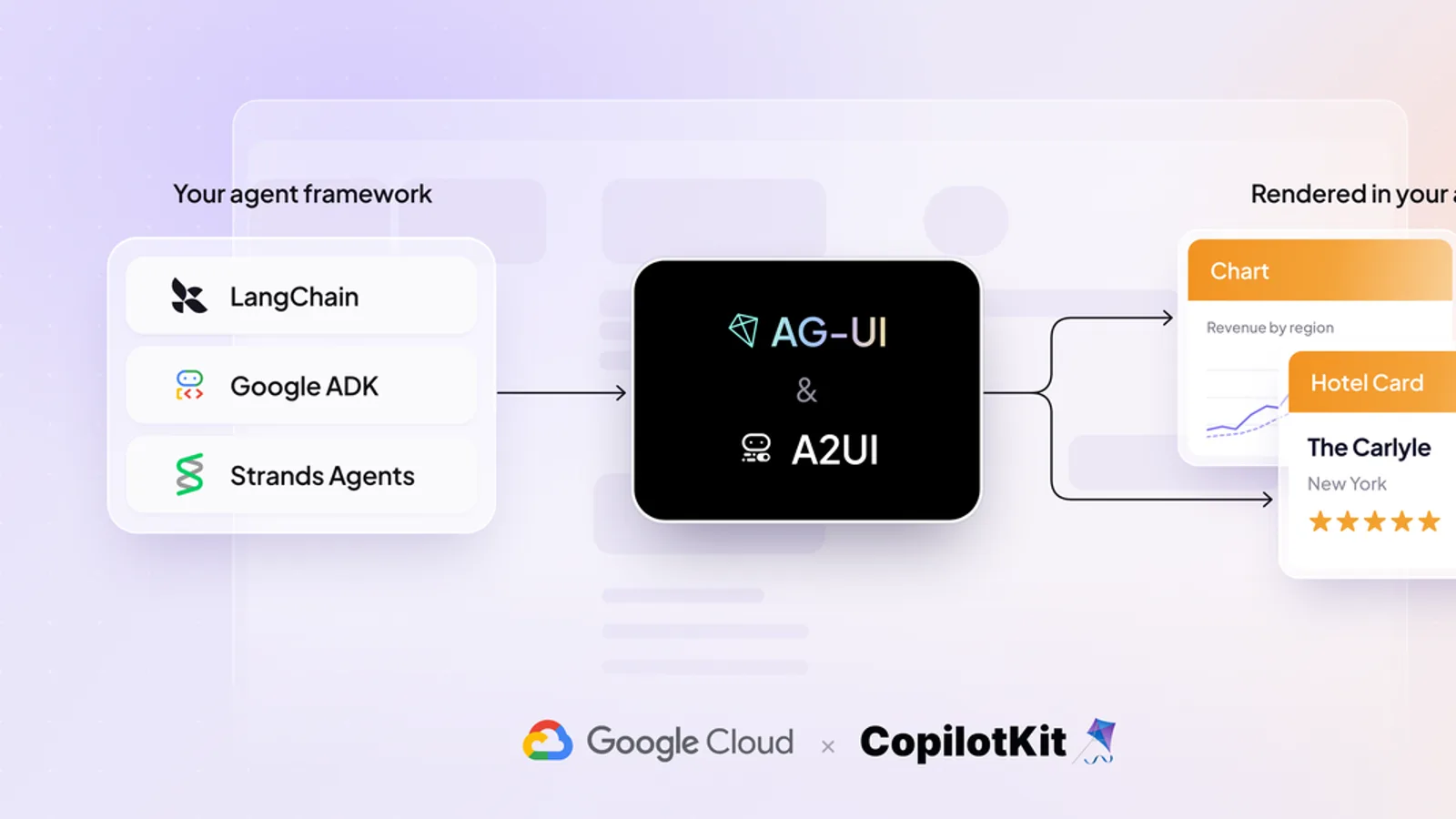
Generative UI shifts the burden of layout construction from compile-time templates to runtime orchestration. In this architecture, backend agent frameworks such as LangChain, Microsoft agents, AWS Strands, and Google ADK process user intent and data logic. The CopilotKit SDKs for A2UI act as the bridge, translating backend agent outputs into structured payloads that frontend runtimes parse and render natively. This decouples interface design from rigid frontend routing and allows components to appear contextually based on the active agent state.
Example
Consider a workflow where a user requests a data summary from a backend agent built on LangChain or Microsoft agents. Instead of returning raw text or markdown, the agent emits a structured schema via the CopilotKit SDK for A2UI. The frontend runtime receives this payload, maps the schema descriptors to native component libraries, and dynamically instantiates a rendered UI component tree, such as an interactive chart or a specialized form, directly inside the application view.
Practical Advice
For teams building pilot projects, start by establishing a clear contract between your backend agent framework and your frontend component library. Limit initial generative UI experiments to non-critical auxiliary panels rather than core navigational flows. Ensure your chosen framework, whether LangChain, AWS Strands, Google ADK, or Microsoft agents, reliably serializes output structures that your frontend runtime safely evaluates and renders without risking execution errors.
Limitations
Several uncertainties remain for engineering teams evaluating this architecture. Official sources do not detail exact API stability guarantees, long-term release schedules, or performance overhead metrics for complex component trees. Teams must carefully evaluate state synchronization mechanics between asynchronous backend agents and synchronous frontend interfaces, along with the security implications of rendering dynamic payloads generated by language models.
CodePlay Developer Take
From a development perspective, moving toward dynamic component trees introduces architectural complexity. While the promise of generative UI is streamlined development, teams face heightened state management challenges. Synchronizing the local state of a dynamically rendered component tree with the underlying state of a distributed agent framework, such as LangChain or Microsoft agents, requires rigorous boundary definitions. Maintenance overhead increases because debugging a UI rendered at runtime is inherently more difficult than inspecting static code.
CodePlay Verdict
For engineering and product leadership, generative UI represents an architectural frontier requiring cautious adoption. Organizations should pilot A2UI and CopilotKit integrations in sandbox environments or isolated feature flags. Wait for broader consensus on API stability and standardized security practices before committing core production workflows to fully dynamic, agent-driven user interfaces.
Sources & Further Reading
- Build Generative UI Apps with A2UI & CopilotKit Agents — primary source
Sources & Further Reading
CodePlay Insights references primary sources. Original reporting and announcements belong to their publishers.